Online lotteries, raffles, and giveaway campaigns have become one of the most powerful growth strategies for WooCommerce stores. When done right, a WooCommerce Lottery Plugin can help you increase sales, grow your email list, boost engagement, and build long-term customer loyalty. In this in-depth guide, we’ll walk you through everything you need to know—from choosing the right WooCommerce lottery plugin, setting it up, real-world case examples, and best practices—so you can run successful online lotteries with WooCommerce.
What Is a WooCommerce Lottery Plugin?
A WooCommerce Lottery Plugin allows store owners to create and manage lottery-style campaigns directly inside their WooCommerce store. Customers can purchase lottery tickets, enter raffles, or participate in giveaway contests for a chance to win prizes.
Unlike traditional discount campaigns, lotteries introduce excitement, urgency, and gamification—powerful psychological triggers that drive higher conversions.
Key Features of a Lottery Plugin
- Ticket-based lottery or raffle system
- Automated winner selection
- Countdown timers & urgency elements
- WooCommerce payment integration
- Email notifications & winner announcements
- Fraud prevention & fair draw mechanisms
Why Online Lotteries Work So Well for WooCommerce Stores
Running an online lottery is not just about selling tickets—it’s about creating an engaging experience.
Benefits of Using a WooCommerce Lottery Plugin
- Increase Revenue Quickly
Lotteries encourage impulse purchases. Customers are more likely to buy a low-cost ticket for a high-value prize. - Boost Customer Engagement
Gamified campaigns encourage users to interact with your site for longer periods. - Grow Your Email List
Lottery entries can be tied to account creation or newsletter subscriptions. - Improve Brand Visibility
Giveaways are highly shareable on social media. - Clear Old Inventory
Use products as lottery prizes instead of heavy discounts.
Types of Online Lotteries You Can Run with WooCommerce
Using a modern WooCommerce Giveaway Lottery Plugin, you can create multiple campaign types:
- Paid Lotteries – Users buy tickets to enter
- Raffle Campaigns – Limited tickets with higher perceived value
- Free Giveaways – Entry via signup or social actions
- Membership-Only Lotteries – Exclusive rewards for loyal customers
- Seasonal Campaigns – Black Friday, Cyber Monday, Eid, New Year
How to Choose the Right WooCommerce Lottery Plugin
Choosing the right WooCommerce lottery plugin is critical for performance, compliance, and scalability.
Must-Have Criteria
- WooCommerce Native Integration
The plugin should work seamlessly with WooCommerce products, cart, and checkout. - Ease of Setup & Management
A clean dashboard saves time and reduces errors. - Flexible Lottery Rules
Support for ticket limits, start/end dates, and winner logic. - Automation Features
Automatic draw, email notifications, and status updates. - Security & Fairness
Transparent winner selection and anti-fraud mechanisms. - Scalability & Performance
Must handle high traffic during viral campaigns.
Best Practices for Running a Highly Successful Online Lottery
To truly maximize your return on investment (ROI) and maintain long-term customer trust, you need to implement a strategic approach to how you manage and market your draws. Choosing a powerful plugin is only the first step toward building a profitable competition site. By following these industry-proven best practices, you can ensure that your participants feel valued and that your lottery campaigns operate at peak efficiency.
1. Legal & Compliance Considerations
- Transparent T&Cs: Always have a dedicated page explaining what happens if the minimum ticket sales aren’t met. Do you offer a full refund or a cash alternative? Having these answers ready builds immense trust.
- Payment Gateway Compliance: This is a crucial step often overlooked. Major processors like Stripe or PayPal have strict policies against gambling. Review your provider’s “Acceptable Use Policy” or consider high-risk payment gateways to ensure your account isn’t suspended mid-campaign.
- Server Performance: Lotteries create massive traffic spikes, especially in the final hour when the countdown timer is about to hit zero. To prevent losing sales at the most critical moment, you must ensure your hosting can handle multiple concurrent checkout requests. While many suggest enterprise hosting, we recommend Hostinger for its excellent balance of speed and scalability for growing eCommerce brands.
2. Marketing Tips to Sell More Raffle Tickets
Once your technical setup is secure, you need a marketing engine to drive sales. A lottery is an event, and it should be treated with the same excitement as a product launch.
- Social Proof: Use live “Recent Participant” notifications.
- Email Remarketing: Send a “Final Countdown” alert 24 hours before the draw ends.
Top WooCommerce Lottery Plugin:
1. Giveaway Lottery for WooCommerce – The Gold Standard for Professional Lotteries
When it comes to high-stakes raffles and seamless store integration, Giveaway Lottery for WooCommerce stands in a league of its own. Unlike generic giveaway tools, our plugin is built from the ground up specifically for WooCommerce store owners who prioritize transparency and automation.
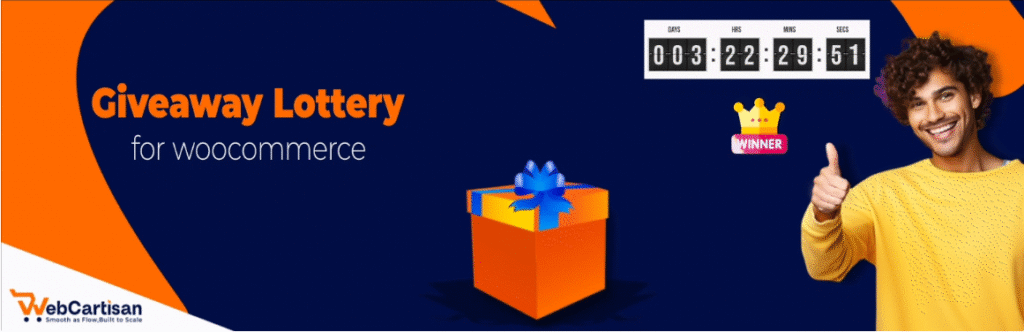
It eliminates the technical headaches of manual draws by handling everything from secure ticket generation to randomized winner selection. Whether you are running a charity raffle or a luxury car giveaway, this plugin ensures your brand remains reputable while your sales scale.
- Type: Free & PRO
- PRO Pricing (1st Tier): $89/year for a single-site license.
- Best For: Professional businesses, high-value prize draws, and users seeking a fully automated “set-and-forget” system.
- Key Features:
- 🎫 Unlimited Raffle Campaigns: Run unlimited raffles with flexible rules, ticket limits, and scheduled draws.
- ⚡ Instant Win Rewards: Reward customers instantly after purchase to boost excitement and repeat entries.
- 🎡 Lucky Wheel (Spin & Win): Gamify your store and grow your email list with engaging spin-to-win rewards.
- ⭐ Reward Points System: Create flexible reward rules with bonus entries and loyalty incentives.
- 📥 Export Tickets (CSV): Export sold ticket data for reporting, audits, and winner verification.
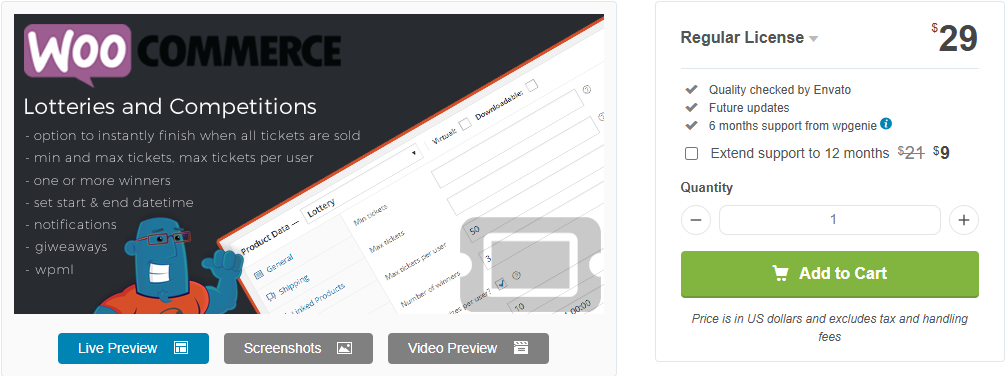
2. Lottery for WooCommerce (by WPGenie)
Widely considered one of the industry veterans, this plugin is a powerhouse for true lottery functionality. It is designed specifically for selling tickets as unique product types, making it feel like a natural extension of the WooCommerce ecosystem.
- Type: PRO Only
- PRO Pricing (1st Tier): $29 (Regular License – Includes 6 months of support).
- Best For: Advanced users who need deep customization for paid lottery products.
Key Features: Ability to define the number of winners, public attendee lists for social proof, and support for “failed” lotteries (refund management).
3. RafflePress
If your primary goal is viral growth rather than direct ticket sales, RafflePress is a top contender. It excels at “action-based” entries, where users earn chances to win by following your social media accounts or sharing your content.
- Type: Free & PRO
- PRO Pricing (1st Tier – Plus Plan): $39.50/year (Standard price is $79/year, but it is almost always on sale for 50% off for new customers).
- Best For: Viral marketing campaigns, building email lists, and social media growth.
Key Features: A drag-and-drop giveaway builder, pre-made viral templates, and robust fraud protection to prevent spam entries.
4. Giveaway for WooCommerce (by FantasticPlugins)
This plugin is perfect for stores looking to add an interactive “Instant Win” element to their sales. It bridges the gap between traditional shopping and lucky draws, offering a unique “skill-based” question feature which is vital for legal compliance in many regions.

- Type: PRO Only
- PRO Pricing (1st Tier): $79/year.
- Best For: Instant-win rewards and competitions that require a quiz or skill-based entry.
Key Features: Answer-verification logic, tiered reward rules, and customizable PDF ticket downloads for winners.
Why a Standard Store Needs a Dedicated Lottery Solution
A standard WooCommerce setup is designed for simple transactions, not complex draws. To run a successful lottery, you must bridge the gap between a basic purchase and a fair competition. Here is how a specialized plugin handles that:
1. Automated Technical Management
The biggest risk of running a manual raffle is human error. Instead of manually tracking spreadsheets to see who bought which ticket number, a dedicated plugin automates the heavy lifting :
- Automatic Ticket Generation: Assigning unique, random, or sequential numbers to every purchase instantly.
- Time Management: Establishing strict, automated start and end times for draws.
- Winner Selection: Ensuring transparent, randomized picking of winners to maintain trust.
- User Dashboards: Allowing customers to log in and view their active tickets in real-time.
2. Boosting Customer Lifetime Value (CLV)
Competitions create a “sticky” website. When users purchase a ticket, they become emotionally invested in the outcome and return to check results.
- Data Capture: By using a WooCommerce Lottery Plugin, you capture valuable email addresses and pixel data for future remarketing.
- Lower Acquisition Costs: Retaining an existing “player” is significantly cheaper than acquiring a new customer for every product.
Best Lottery Plugins Real-World Use Cases to Inspire You
Sometimes, seeing a concept in action makes all the difference. Many successful brands use lotteries not just for sales but as a core pillar of their marketing strategy to build long-term engagement. By turning a simple purchase into a shared experience, these businesses create a “halo effect” around their brand that lasts long after the winner is announced.
Case 1: Real-World Success: The Hodinkee Model
A prime example of this strategy in action is how the luxury watch authority Hodinkee manages high-demand releases. Instead of a standard “first-come, first-served” sale, which often leads to site crashes and frustrated customers, they utilize a timed “Drawing” system.

By running a 48-hour raffle for limited-edition timepieces, they achieve three critical goals:
- Massive Traffic Spikes: The limited window creates a “must-act-now” mentality, driving 10x more traffic than a standard launch.
- Lead Generation: According to reports on high-end eCommerce scarcity marketing from Business of Fashion, this method allows brands to collect thousands of new email leads from participants who didn’t win but are now primed for future offers.
- Market Fairness: It prevents “bots” from buying up all the stock, ensuring the brand remains reputable among its core community.
Case 2: Real-World Success: The “Give & Win” Model
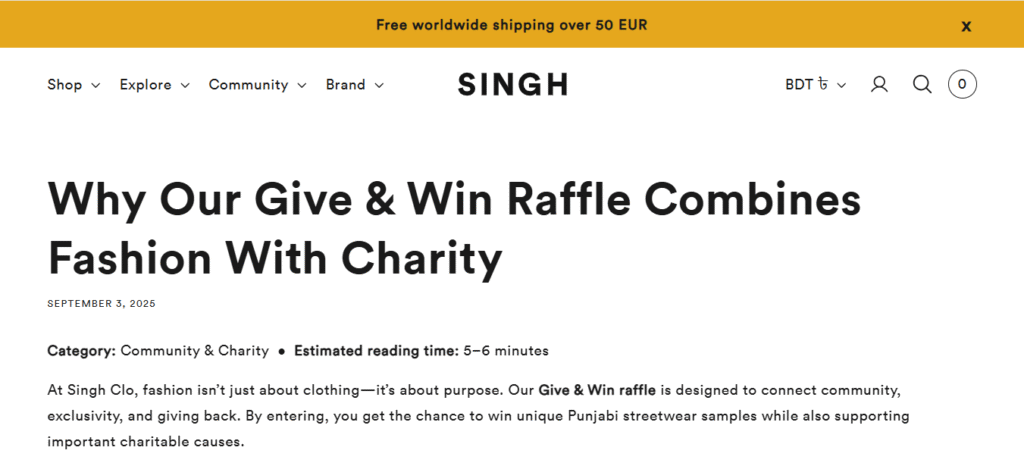
Singh Clo, a purposeful streetwear brand, utilizes a “Give & Win” raffle system to connect their community with charitable causes. During their seasonal campaigns, they offer exclusive, limited-edition samples, pieces that are otherwise unavailable for purchase as raffle prizes.
By pivoting from a standard sale to a charity-driven draw, they achieve remarkable results:
- High Donation Volume: Instead of selling one item to one person, they sell hundreds of low-cost raffle tickets. This allows them to donate 50% or more of the proceeds to global charitable projects while still covering their costs.
- Explosive Social Proof: According to BigCommerce, social proof is a critical driver for eCommerce success. When a brand demonstrates a commitment to a cause through a public raffle, it builds a level of trust and “brand halo” that standard advertising cannot buy.
- Community Loyalty: Participants feel like they are part of a movement. Even those who don’t win the $500 gift card or the exclusive hoodie walk away feeling positive about the brand because their contribution supported a local shelter or global cause.
How to Set up a WooCommerce Lottery Plugin: A Step-by-Step Guide
Step 1: Installation and Environment Preparation
Ready to transform your store? Most e-commerce store owners handle the entire setup directly within their site’s backend. Rather than jumping between screens, you can complete the installation in one smooth motion:
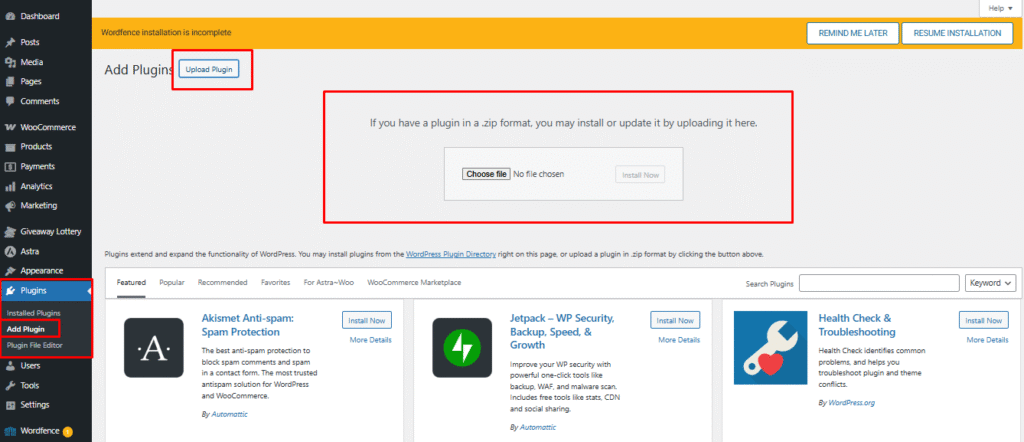
- Navigate to the Plugin Area: From your WordPress sidebar, go to Plugins > Add New.
- Upload the Plugin: Click the Upload Plugin button at the top of the page.
- Upload and Activate: Choose the .zip file you downloaded from your account, click Install Now, and then click Activate once the process is complete.
Pro Tip: Ensure your WooCommerce environment is fully updated, and your payment gateways are active before launching your first draw.
Step 2: Global Configuration and Settings
Before creating your first raffle, you must configure the “Rules of the game” in the global settings. Navigate to WordPress Dashboard > Giveaway Lottery to define how your tickets, timers, and winners will behave.
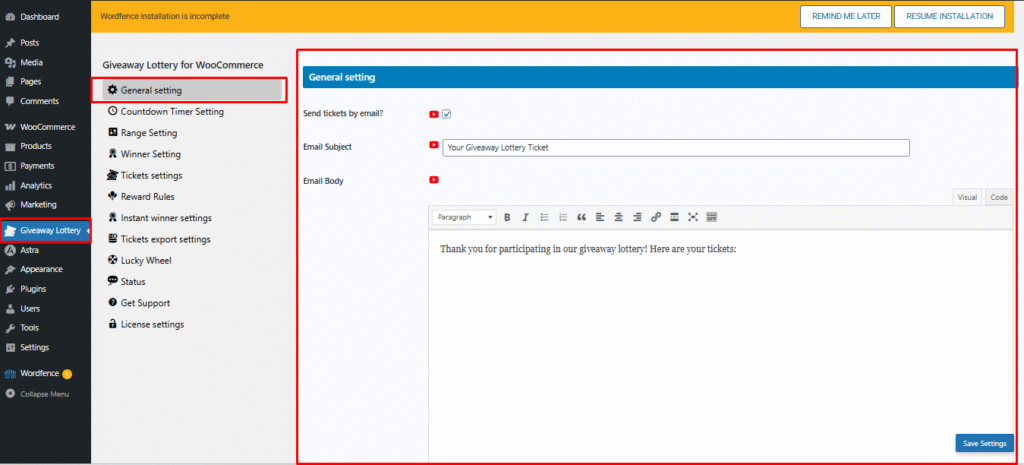
Go to WordPress Dashboard, then click on Settings > General.
Step 3: Create Your First Lottery Product
With the plugin configured, you can now turn any product into a high-engagement competition –
- Add a New Product: Navigate to Products > Add New from the WooCommerce dashboard.
- Enter Product Details: Provide the product name and a clear product description in the editor.
- Proceed to Configuration: Once details are added, scroll down to configure product and giveaway settings.

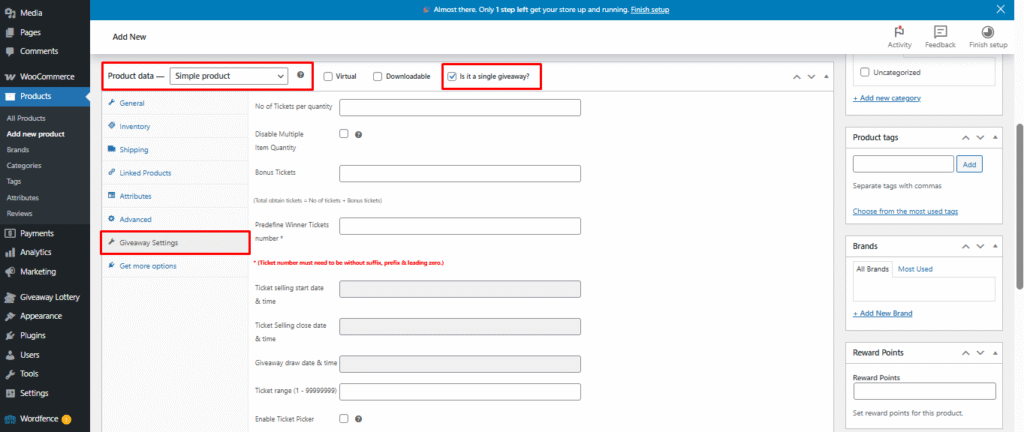
- Select Product Type: In Product Data, keep a Simple product selected and enable “Is it a single giveaway?”
- Configure Giveaway Settings: Open the Giveaway Settings tab to define ticket quantity, bonus tickets, predefined winner tickets, selling period, and draw date.
- Finalize Ticket Rules: Set the ticket range, enable the ticket picker if required, review all settings, and save the product.
Step 4: Predefine Winner Tickets number
Timing is everything in a successful raffle. Use the built-in scheduler to automate the entire lifecycle of the contest. Predefine Winner Tickets Number: Enter the specific ticket number(s) that will be marked as winners for the giveaway. Ticket numbers must be entered without any suffix, prefix, or leading zeros to ensure accurate winner selection.
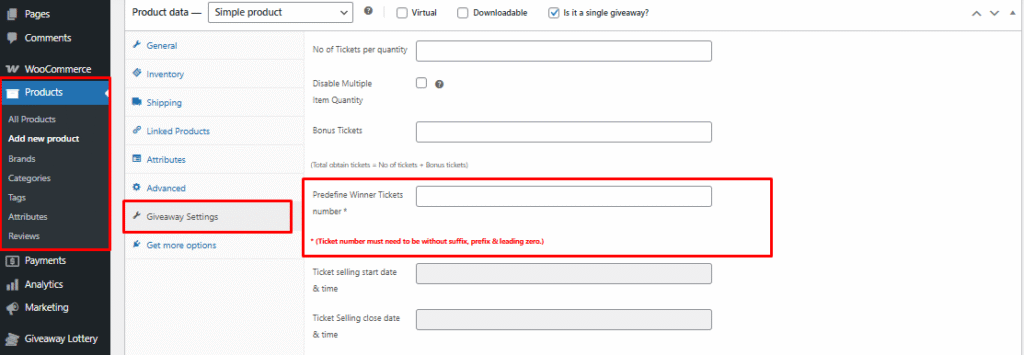
NOTE: The required fields: number of tickets per quantity, regular price, ticket selling start and close date & time, they are mainly needed to showcase the product; filling out every field beyond these offers little benefit.
WooCommerce Lottery Winner Selection: Ensuring Fairness
The most critical part of any lottery is how you pick the winner. If your customers suspect the process is rigged, your reputation is ruined. Using a trusted WooCommerce Lottery Plugin provides the transparency needed to build a loyal community.
Automatic Selection
Most plugins offer a cron-job-based feature where the system automatically picks a winner the second the timer hits zero. It uses a random number generator (RNG) to select a ticket from the sold pool. This is the most efficient method for high-volume eCommerce stores that want to eliminate human error or bias from the draw.
Manual Selection for Live Streams
For high-value prizes, you might want to record the draw to maximize social proof. In this mode, you export the list of participants and use a third-party randomizer (like Random.org) on a live stream. You then manually input the winning Ticket ID into the backend to notify the user.
Skill-Based Selection (Compliance)
In many regions (like the UK), a “Lottery” is gambling, but a “Competition” based on skill is not. Plugins like Giveaway for WooCommerce allow you to add a question ( “What is the capital of France?”) that a user must answer correctly before they can buy a ticket. This simple step can change the legal definition of your event and protect you from regulatory issues.
Boost Your Store Engagement with a WooCommerce Lottery Plugin
Choosing the right WooCommerce lottery plugin is about balancing advanced features with rock-solid reliability. You need a system that guarantees fairness for your entrants and provides ease of management for your team. By following this guide, you can launch engaging campaigns that not only drive massive traffic but also create a loyal community of participants who return to your store for every new draw.
The key to long-term success lies in transparent winner selection, legal compliance, and a seamless user experience. Instead of settling for generic tools, investing in a dedicated solution like Giveaway Lottery for WooCommerce ensures your brand’s reputation remains untarnished while your revenue scales. We recommend starting with a simple “lucky draw” to build trust with your audience and test your payment gateways before moving on to high-value raffles.
The future of eCommerce is interactive, and there is no better time than now to transform your store into an engaging competition hub.
FAQ’s:
- How do I ensure the draw is fair for everyone?
Answer: Transparency is built in; you can display a public “Entry List” so participants see their tickets, and use a “cron-job-based” random generator to pick winners without any manual interference.
- Do I need to know how to code to set this up?
Answer: Not at all. The entire process from installation to setting the “Rules of the game” is done through a user-friendly WordPress interface with zero coding required.
- Can I customize the design to match my brand?
Answer: Yes! You can easily adjust the colors of the countdown timers and progress bars to ensure the lottery looks like a seamless part of your eCommerce store.
- What happens if too many people join at once?
Answer: By using a reliable host like Hostinger, your site will stay fast and responsive even during the final “FOMO” minutes of a popular draw.
- Can I schedule lotteries in advance?
Answer: Absolutely. You can set your start and end dates once, and the system will automatically open and close the draw, pick the winner, and notify participants while you focus on other parts of your business.