In the hyper-competitive world of e-commerce, capturing a visitor’s attention is only half the battle; the real challenge lies in conversion. Gamification has emerged as a high-conversion reality, moving beyond a simple trend to become a staple for successful online retailers. One of the most effective ways to transform “just browsing” visitors into loyal, paying customers is through a Lucky Wheel Giveaway.
Today, we will guide you on how you can design a lucky wheel giveaway for your online store and skyrocket revenue.
Imagine the thrill of spinning a colorful wheel, the anticipation building as it slows down, and finally landing on a prize! Designing your lucky wheel isn’t just about aesthetics; it’s about creating an engaging experience that captivates your audience.
By offering a chance to win valuable prizes in exchange for an email address, you’re not only delivering excitement but also creating a “win-win” scenario. Customers enjoy the thrill of a potential win, and you gain high-quality leads.
What is the Lucky Wheel Giveaway?
Remember in our childhood, ice cream-selling carts used to carry a spin wheel, with which sometimes we could get double scoops and sometimes none? Well, the joy’s modern version is the online lucky wheel giveaway. And the most amazing thing is, no matter what you are selling through your online store, a lucky wheel can bring back the same excitement and engagement to your business and skyrocket sales.
A Lucky Wheel Giveaway is a gamified promotional tool where participants spin a virtual wheel for a chance to win various prizes, rewards, or discounts. If you are a business owner, a lucky wheel giveaway can be an effective way to boost sales and build customer loyalty. The interactive nature of the wheel creates excitement and encourages participation, leading to higher engagement and conversions.
The key components of a lucky wheel giveaway are:
- The Wheel: A circular display divided into segments, each representing a specific reward or a “try again” outcome.
- Entry Requirement: Users typically must act to earn a spin, such as entering an email address, following a social media account, or being a registered member.
- Prizes: Common rewards include discount coupons (e.g., “10% Off”), loyalty points, free products, or digital gift cards.
The spinning wheel isn’t just a tool, it’s a spark of excitement. It captures that childhood joy of a carnival game and brings it straight to your WooCommerce store. When a customer sees those colors blur and hears the virtual click of the wheel, they aren’t just looking at a discount; they are feeling the thrill of the win. This emotional “High” is exactly what turns a casual clicker into a loyal fan who is actually excited to stay and shop.
When Should You Use a Lucky Wheel Giveaway?
A lucky wheel works best when you deploy it with purpose, not as a permanent fixture, but as a strategic tool for the right moment. Here’s exactly when to spin it up:
New eCommerce Store Launches
A brand new eCommerce store faces one brutal reality: With no traffic, no trust, and no leads. A lucky wheel giveaway solves all three at once. Place it on your homepage as a welcome offer: visitors spin to win a discount, a free product, or exclusive early access. To claim their prize, they enter their email. That single interaction builds your first subscriber list, gives visitors a reason to explore your store, and creates the kind of first impression that turns a one-time visitor into a returning customer. Before your store even finds its footing, the lucky wheel is already doing the heavy lifting , generating leads and driving engagement from day one.
Seasonal Sales & Campaigns (Black Friday, Holiday Sales)
During the chaos of Black Friday or the Holidays, every store is screaming “Discount!” To stand out, you need to offer excitement, not just a price cut. By designing a seasonal lucky wheel with festive colors and high-stakes prizes, you give shoppers a reason to choose your store over a boring competitor.
Exit-Intent or First-Time Visitor Offers
There is nothing more painful than watching a visitor reach for the “X” button on their browser tab. An exit-intent wheel is your “Wait, don’t go!” moment. Think about it,a shopper browses your store, adds items to their cart, and then moves their cursor toward the close button. That’s your cue. Trigger a lucky wheel pop-up right at that moment and watch what happens. The secret lies in the power of surprise and reward. When a visitor is about to leave, they’ve mentally “checked out” but a spinning wheel flips the script. Suddenly, they’re not leaving a store; they’re playing a game. That tiny shot of excitement, the anticipation of watching the wheel spin, is enough to pull them back in. And when they land on a discount or a freebie? That feels like a win and people love to shop when they’re feeling like a winner.
Instead of losing them forever, you give them one last reason to stay for a spin, a chance to win, and a discount they didn’t expect. Set it up in your lucky wheel settings by enabling exit-intent detection, then pair it with a high-value prize like free shipping or 15% off. Done right, this single trigger can recover 10-15% of abandoning visitors before they ever leave your page.
Clearing Old Inventory of Online Store
Struggling to move slow-selling inventory? Here’s how a lucky wheel can help. Instead of burying slow-selling products in a clearance section, put them on the wheel. Framing old inventory as a “Grand Prize” or a “Free Gift” adds a layer of prestige to the item. It turns “getting rid of stock” into “giving away a win,” making your customers feel lucky to take it off your hands.
Benefits of Using a Lucky Wheel Giveaway in Your Online Store
1. Boost Email Sign-Ups & Lead Generation
Traditional email signup forms have one of the lowest conversion rates in digital marketing averaging just 1.95% across all industries. So if your “Sign up for updates” box isn’t pulling numbers, you’re not alone. Most visitors see a standard signup form and immediately think: why hand over my email just to be spammed? But a Lucky Wheel Giveaway flips the script entirely, turning a boring data exchange into a high-stakes game. By designing an inviting, high-contrast wheel, you make providing an email address feel like a fair trade for the chance to win big.
2. Increase Conversion Rates Instantly
Indecision is the enemy of sales. Often, a customer is just one small “push” away from buying. The thrill of winning a 15% discount or a “Free Shipping” perk through a spin provides that exact psychological nudge. It’s the difference between a visitor thinking “maybe later” and “I have to use this prize now!”
3. Reduce Cart Abandonment
Cart abandonment is one of the biggest revenue leaks in eCommerce, with nearly 70% of shoppers leaving without completing their purchase, according to Baymard Institute. Most of the time, they don’t leave because they dislike your product. They leave because something distracted them, they weren’t fully convinced, or the timing just wasn’t right.
That’s exactly where a lucky wheel becomes your most powerful recovery tool. Set it to trigger when a visitor moves to close the tab or navigate away from the checkout page. A well-timed discount or free shipping offer displayed on the wheel is often all it takes to turn a hesitant shopper into a paying customer. They came so close to buying sometimes they just needed one last nudge. The wheel gives them a reason to stay, a reason to complete that purchase, and most importantly, a reason to feel good about it. Instead of losing that sale forever, you’re giving yourself one more shot and a spinning wheel is a hard offer to walk away from.
The moment they try to leave, a lucky wheel pop-up appears offering them one last spin for a surprise discount, free shipping, or a bonus gift. Not every spin-the-wheel plugin offers this level of smart exit-intent targeting, making it a rare and powerful advantage for store owners who want to recover lost sales. That unexpected moment of delight interrupts the abandonment pattern and gives shoppers a concrete reason to complete their purchase right now, something most stores simply can’t do.
Unlike a generic discount banner, the lucky wheel makes the offer feel earned. Shoppers feel like they won something, and that emotional shift from hesitation to excitement is often all it takes to bring them back to the checkout page and complete the order.
3. Improve Customer Engagement & Retention
Humans are hardwired to remember how a brand made them feel. By offering a fun, interactive giveaway, you aren’t just selling a product; you’re providing a positive memory. When customers associate your store with the “win” they got on the wheel, they are far more likely to return, transforming a one-time shopper into a long-term fan.
3 Crucial Lucky Wheel Giveaway Strategies You Must Remember
A lucky wheel is only as powerful as the strategy behind it. Slapping a spin wheel on your site without a plan is like handing out coupons in an empty store the tool is there, but the impact isn’t. To get real results, you need to be intentional about how you set it up, what you offer, and when you trigger it. Here are three strategies that separate high-converting lucky wheels from the ones that just collect dust.
1. Define Your Goal (Leads, Sales, Traffic, Retention)
Before you touch a single design setting, ask yourself, “What is the win for my business?”
- If it’s Leads: Your wheel should trigger the moment a user lands on the page.
- If it’s Sales: Use “High-Value” discount slices (like 20% off) to push users toward a first-time purchase.
- If it’s Retention: Show the wheel to returning customers only, offering a “Loyalty Gift” to keep them coming back.
2. Choose the Right Lucky Wheel Plugin or Tool
For WooCommerce store owners, the “engine” behind your wheel determines how smooth the experience feels. You need a plugin that is lightweight, mobile-responsive, and easy to customize. Here are the top contenders in 2026:
- Giveaway Lottery for WooCommerce: The ultimate native WooCommerce solution for running engaging raffles, lucky draws, and spin-to-win campaigns effortlessly.
- OptinMonster: The gold standard for conversion and beautifully designed “Spin-to-Win” templates.
- WP Optin Wheel: A fantastic, user-friendly option that offers a great free version for beginners.
- Lucky Wheel for WooCommerce: A robust, native WooCommerce extension that handles coupon generation effortlessly.
- Poptin: A powerful gamified popup builder with 20,000+ active installations, offering spin-to-win wheels and seamless WooCommerce integration.
- SPINIO: A beginner-friendly spin wheel plugin that converts visitors into subscribers with fully customizable discount coupons and fortune wheel experience.
RafflePress vs. Giveaway Lottery for WooCommerce: Which is right for you?
Choosing the right giveaway tool for your store isn’t just a feature comparison; it’s a strategic decision. RafflePress and Giveaway Lottery for WooCommerce both help you run contests and engage your audience, but they’re built for very different purposes. RafflePress is a standalone WordPress giveaway plugin focused on social sharing and viral growth, while Giveaway Lottery for WooCommerce is built specifically for WooCommerce stores, deeply integrated with your products, orders, and customer data. Before you decide, it’s worth understanding exactly what each tool does well and where each one falls short, explore our in-depth RafflePress vs. Lottery Giveaway for WooCommerce comparison to find the best fit for your store.
3. Set Eligibility & Usage Conditions
A lucky wheel only works in your favor when the prizes are set up with clear boundaries. Before you launch, head over to the “Usage Conditions” section in your plugin settings. This is where you define exactly how and when each prize can be claimed, so the excitement of winning never comes at the cost of your profit margins. Here’s what to configure:
- Limit one spin per email/IP address to prevent “coupon farming.”
- Set expiry dates on won coupons to create urgency (e.g., “Use your 15% discount in the next 24 hours!”).
- Exclude specific products (like already-discounted items) from being eligible for wheel prizes
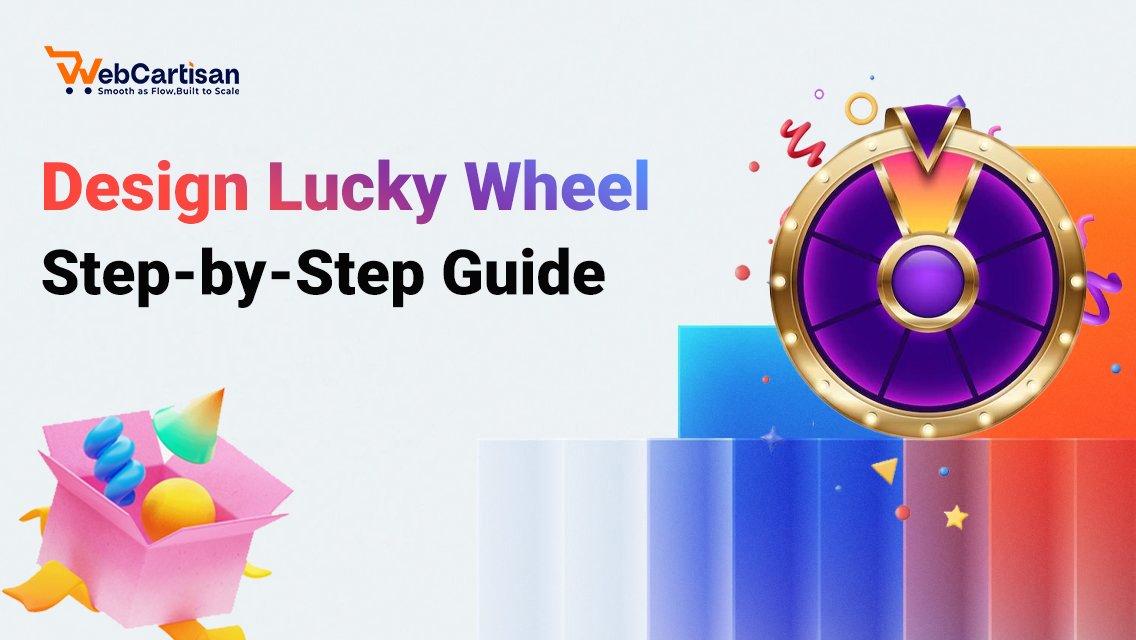
How to Design a Lucky Wheel Giveaway on Your Woo Store? [Step-by-Step Guide]
Designing a wheel that actually converts requires a perfect balance between eye-catching visuals and seamless functionality. While there are many tools on the market, this tutorial features Giveaway Lottery for WooCommerce as the primary example.
This plugin is the ideal choice for store owners who prioritize brand consistency. It offers highly flexible design controls that allow you to match the wheel’s aesthetics perfectly to your store’s identity, all while the “backend” automatically handles the complex math of a lottery system. This ensures that your visitors enjoy a professional experience while you focus on scaling your sales.
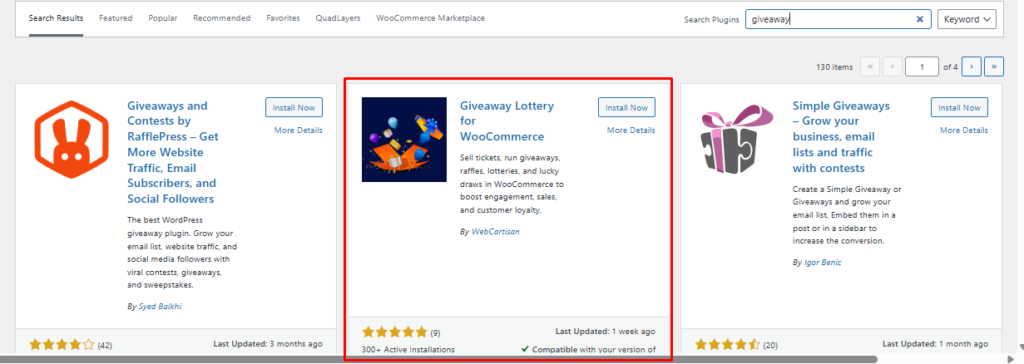
Step 1: Install and Activate Lottery Giveaway for WooCommerce Plugin
The foundation of a high-converting campaign starts with the right engine. Once the Lottery Giveaway for WooCommerce plugin is activated, it becomes the command center for your store’s gamification. Unlike generic tools, this native integration ensures that every spin and every prize is perfectly synced with your WooCommerce inventory and checkout flow.
Step 2 – Design Lucky Wheel Layout & Segments
From your WordPress dashboard, go to Giveaway Lottery > Lucky Wheel > Layout Settings. This is where you build the visual structure of your wheel. Start by setting the number of segments; a four-slice wheel works well for a focused flash sale, while a twelve-slice wheel adds more variety for a grand opening campaign. Each segment needs a label, a prize value, and a winning probability percentage.
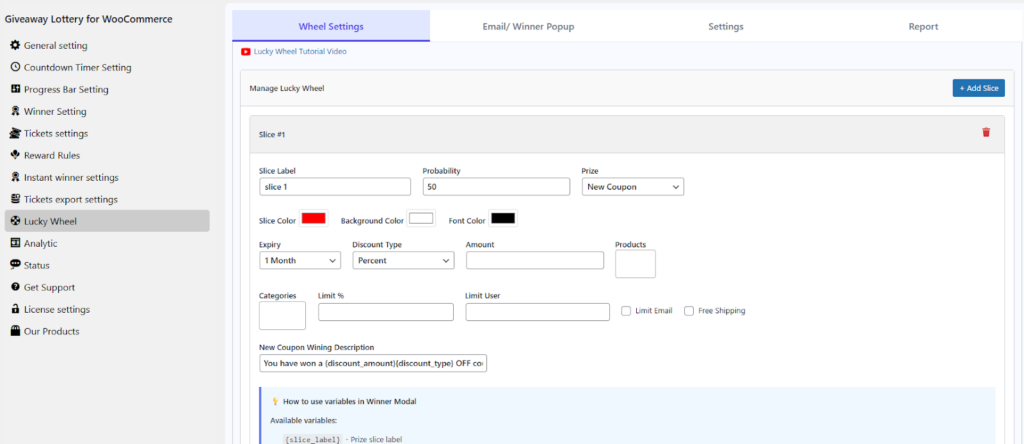
Make sure your probabilities add up to 100% before moving forward. Once the segments are set, adjust the wheel colors, font size, and slice labels directly from the same settings panel. Save your changes and preview the wheel to see exactly how it will appear to your visitors before it goes live.
Step 3: Customize Spin Wheel Colors, Fonts & Branding
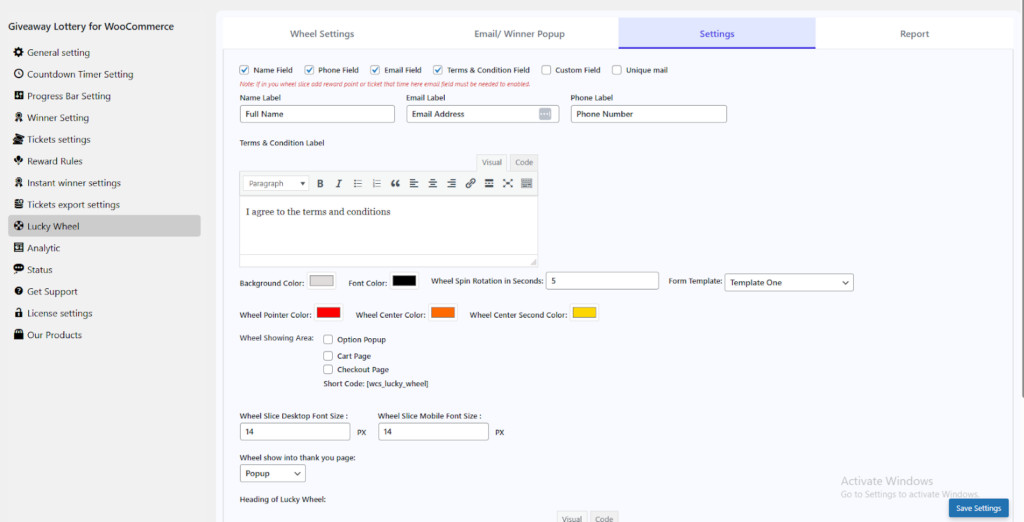
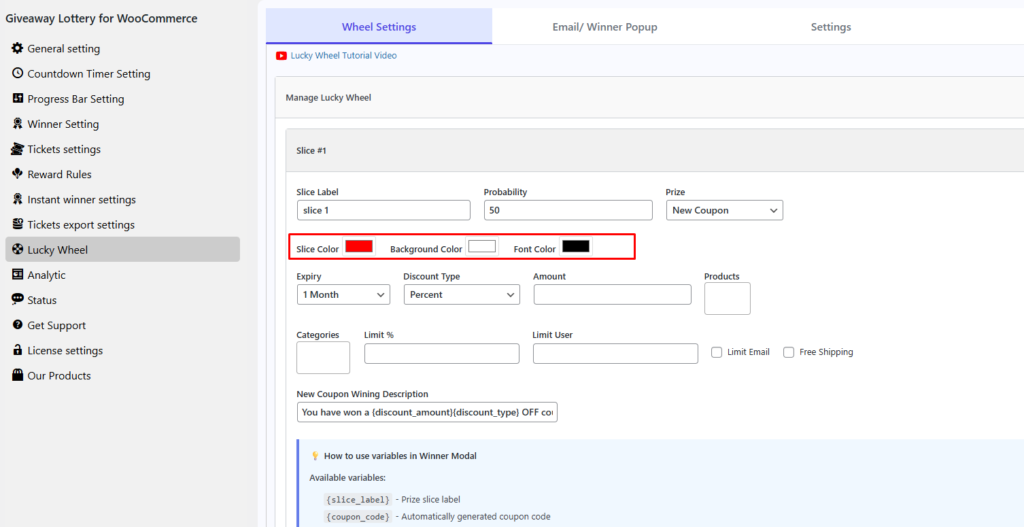
From the Layout Settings panel, scroll down to the Branding & Appearance section. Here you’ll find direct controls for every visual element of your wheel. Start with the Segment Colors , assign alternating colors to each slice so the wheel looks vibrant and easy to scan. Move to the Font Settings to choose your label font style and size, bold, sans-serif fonts work best since they stay readable even during a fast spin. From the Layout Settings panel, scroll down to the Branding & Appearance section. Here you’ll find direct controls for every visual element of your wheel. Start with the Segment Colors, assign alternating colors to each slice so the wheel looks vibrant and easy to scan. Move to the Font Settings to choose your label font style and size, bold, sans-serif fonts work best since they stay readable even during a fast spin.
Next, upload your store logo in the Center Image field; this sits right in the middle of the wheel and keeps your branding visible at all times. Finally, adjust the Button Color and Border Style to match your store’s existing color palette. Once everything looks right, hit Save and use the live preview on the right side of the panel to see your branded wheel exactly as your visitors will see it.
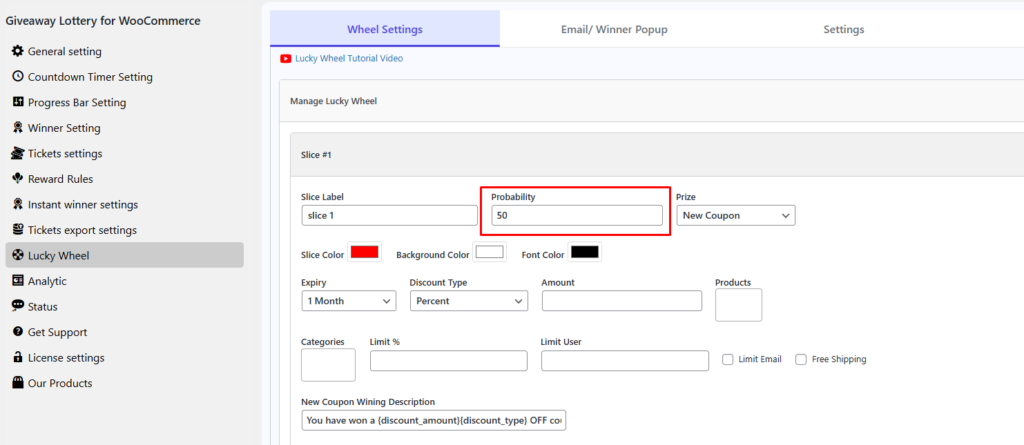
Step 4: Set Online Giveaway Winning Rules & Probability
From your dashboard, go to the Giveaway Lottery > Lucky Wheel > Win Settings. This is where you control exactly who wins what and how often. Start with the Winning Probability field next to each segment, enter a percentage value to define how frequently that prize gets awarded. For example, set your Grand Prize segment to 2% and your Free Shipping segment to 40% to keep big wins rare and small rewards frequent.
Move down to the Eligibility Rules section to define who can spin. You can restrict spins to logged-in users only, limit each email address to one spin per day, or require a minimum cart value before the wheel unlocks. This prevents abuse and keeps your giveaway targeted to real buyers.
Finally, set the Maximum Winner Limit for each prize; once that number is hit, the segment automatically deactivates. This protects your margins without you having to manually monitor the campaign. Hit Save Rules once everything is configured and run a test spin from the preview panel to confirm the settings are working correctly before going live.
Step 5 – Configure Giveaway Participant Email Capture & Automation
From your dashboard, go to Giveaway Lottery > Lucky Wheel > Email Settings. This is where you connect the spin result directly to your email capture and prize delivery flow. In the Email Collection field, toggle on “Require email before spin” this ensures every visitor submits their email address before the wheel unlocks. Once they spin and win, the plugin automatically triggers a prize delivery email to that address.
Move to the Winner Email Template section to customize exactly what the winner receives. Edit the subject line, body text, and coupon code placeholder with the plugin auto-inserts the unique discount code directly into the email, so no manual work is needed on your end.
Scroll down to the Integration Settings to connect your email list directly to Mailchimp, Klaviyo, or your preferred email marketing tool. Every email collected through the wheel is automatically added to your chosen list in real time.
Once configured, hit Save and run a full test spin using a test email address. Check that the winner’s email arrives correctly, the coupon code works at checkout, and the email gets added to your list. When everything checks out, your lucky wheel is fully live and ready to capture leads on autopilot.
Design Lucky Wheel Giveaways That Boost Conversions
At the end of the day, your online store shouldn’t just be a place where people buy things; it should be a place where they have a little bit of fun. We understand that as a store owner, you put your heart into your products, and you deserve a storefront that feels just as alive and welcoming. That’s where a lucky wheel giveaway comes in. It’s not just a marketing tool, it’s a way to bring personality, excitement, and generosity to your storefront. Something that makes visitors stop, smile, and think, “this store gets it.”
A lucky wheel giveaway is one of the simplest ways to make that happen. It doesn’t require a big budget, a development team, or weeks of planning. With the right setup, you can have an engaging, lead-generating, revenue-driving lucky wheel live on your store in under an hour. Start with one trigger, a welcome popup, an exit-intent offer, or a seasonal campaign, and watch how a single spinning wheel changes the way visitors interact with your store. The results will show you exactly where to take it next.
By bringing the excitement of a Lucky Wheel Giveaway to your site, you aren’t just adding a plugin; you’re inviting your customers to share in a moment of joy.
There is no better feeling than watching a visitor turn into a happy winner right before your eyes. With the right design and a touch of creativity, you have the power to turn every click into a connection. a quiet, static shop. Take that first step today, let the wheel spin, and give your brand the vibrant, high-energy personality it truly deserves. Your customers are waiting for that thrill.
Don’t let the journey end here! If you found these design tips helpful, we have plenty more to share. Follow us on Facebook, and Explore more guides to discover more ways to optimize your WooCommerce store and boost your revenue.
Frequently Asked Questions (FAQ)
1. Will a Lucky Wheel slow down my website’s loading speed?
Answer: Not if you use a performance-optimized tool like Giveaway Lottery for WooCommerce. Unlike many heavy, script-bloated apps that drag down your performance, our plugin is built specifically for WooCommerce with speed in mind. It uses lightweight, clean code to ensure that your site stays lightning-fast. For the ultimate user experience, we recommend setting a small delay for the pop-up, allowing your main content to load instantly while the wheel waits for the perfect moment to surprise your visitors.
2. Can I use a Lucky Wheel Giveaway for luxury products?
Answer: Absolutely, but the strategy needs to match the audience. Luxury products cover a wide range: high-end fashion, premium skincare, fine jewelry, designer accessories, luxury watches, and premium home decor. These customers don’t respond to generic “spin to win 10% off” pop-ups. They’re motivated by exclusivity, status, and experiences that feel curated for them.
When running a lucky wheel giveaway for luxury products, skip the standard discounts and offer prizes that feel exclusive: a private styling consultation, early access to a limited-edition drop, or a personalized product engraving. On the design side, keep the wheel minimal and sophisticated with a monochromatic color scheme deep black, champagne gold, or ivory white that mirrors your brand identity. When the experience matches the brand, luxury shoppers engage just as enthusiastically, and the leads you collect are significantly higher in value.
3. How do I ensure the Lucky Wheel leads to actual sales instead of just giving away discounts?
Answer: The secret lies in the “Actionable Reward” strategy. A common mistake is letting customers win a prize and then forgetting about it. Instead of just a “freebie,” the prize becomes a powerful incentive to complete a purchase right now. This transforms the wheel from a simple game into a high-performance conversion engine that protects your margins while rewarding your most engaged customers.
4. Will the Lucky Wheel work for my mobile shoppers?
Over 70% of eCommerce traffic comes from mobile devices, and more than 60% of online purchases are completed on a smartphone. If your lucky wheel doesn’t work seamlessly on mobile, you’re turning away the majority of your visitors before they even spin.
The Giveaway Lottery for WooCommerce is built mobile-first. The wheel automatically resizes, the spin button stays thumb-friendly, and the email field is easy to fill out without zooming or scrolling; no separate mobile configuration is needed.
To check how it looks, go to Giveaway Lottery > Lucky Wheel > Preview and toggle the mobile view directly from the preview panel before going live.
5. Do I need to be a developer to set up a professional Lucky Wheel?
Answer: Absolutely not. We believe that growing your business shouldn’t feel like a technical chore. One of the core strengths of Giveaway Lottery for WooCommerce is its intuitive, “no-code” interface.