Shopify is best for rapid launches and minimal technical work. In contrast, WooCommerce is best for long-term control, customization, and SEO-driven growth if you’re willing to manage hosting and maintenance.
Picking the wrong eCommerce platform is expensive. Either you overpay for features you don’t use, or you encounter a barrier where simple changes necessitate complex migrations.
Most store owners realize their mistake only after they have uploaded thousands of products. However, you won’t, as this guide breaks down the WooCommerce vs. Shopify debate and helps you decide which architecture fits your business stage.
Key Takeaways
- Shopify is for Convenience: It is a hosted rental platform. It is perfect for beginners or brands that want to offload technical maintenance entirely.
- WooCommerce is for Control: It is a self-hosted engine. It is ideal for businesses that prioritize SEO performance, deep customization, and full data ownership.
- The Cost Reality: Shopify becomes expensive as you scale due to transaction fees and app subscriptions. WooCommerce usually offers a lower total cost of ownership for high-volume stores because you avoid revenue-sharing fees.
- Scalability: Shopify handles traffic spikes easily. WooCommerce handles complex product catalogs and intricate business logic better.
WooCommerce vs. Shopify: The Core Difference Explained
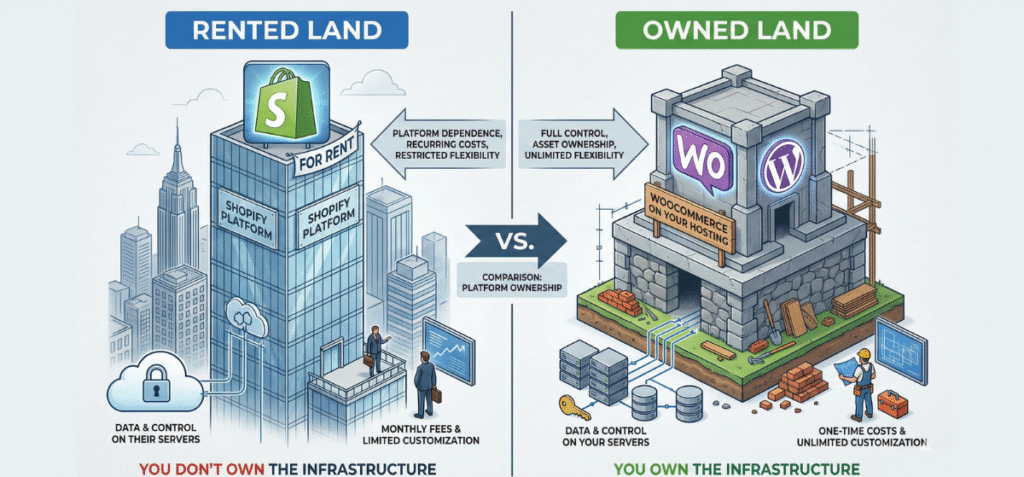
The fundamental difference lies in ownership. Shopify is a hosted SaaS (Software as a Service) tool. WooCommerce is a WordPress plugin that you host yourself.
Shopify = Hosted SaaS, Convenience-First. You pay a monthly fee, starting at $25, to rent their infrastructure. They handle security, hosting, and updates. You focus on selling.
WooCommerce = WordPress Plugin, Ownership-First. Installed directly on your own server, it gives you full ownership of the code, data, and customization. Ongoing maintenance is handled by you.
Here are a few more core differences between these two e-commerce platforms.
Platform Lock-in: You cannot export your Shopify store’s backend code. If they raise prices or ban your account, you lose the infrastructure. With WooCommerce, you can back up your database and move to any host instantly.
Data Ownership: Shopify controls your checkout data. WooCommerce gives you raw access to your database, allowing for complex custom reporting that SaaS tools restrict.
Cost Trajectory: Shopify gets more expensive as you scale (transaction fees + higher plan tiers). WooCommerce often becomes cheaper at scale because flat-rate hosting costs less than revenue-share models.
SEO Scalability: Shopify doesn’t allow Full Customization of URL structures. WooCommerce allows total permalink customization, which is critical for complex site architectures.
Aside from all this, these platforms have the following differences, as mentioned in the table below.
Feature | Shopify (SaaS) | WooCommerce (Open Source) | Winner |
Setup Time | 1-2 days to 2-3 weeks | Tie | |
Hosting Responsibility | Included (Managed) | You manage it (Self-hosted) | Shopify |
Ongoing Costs | Monthly Subscription + Transaction Fees | Hosting + Plugin Licenses | WooCommerce |
Customization Depth | Limited to theme settings & Apps | unlimited (Full Code Access) | WooCommerce |
SEO Control | Good but rigid URL structure | Excellent with granular control | WooCommerce |
Dropshipping | Native integrations | Requires plugin configuration | Shopify |
Payment Gateways | Penalties for non-Shopify Payments | Free choice of any gateway | WooCommerce |
Inventory Management | Simple, Native | Plugin-dependent (Complex) | Shopify |
Ease of Use vs. Control
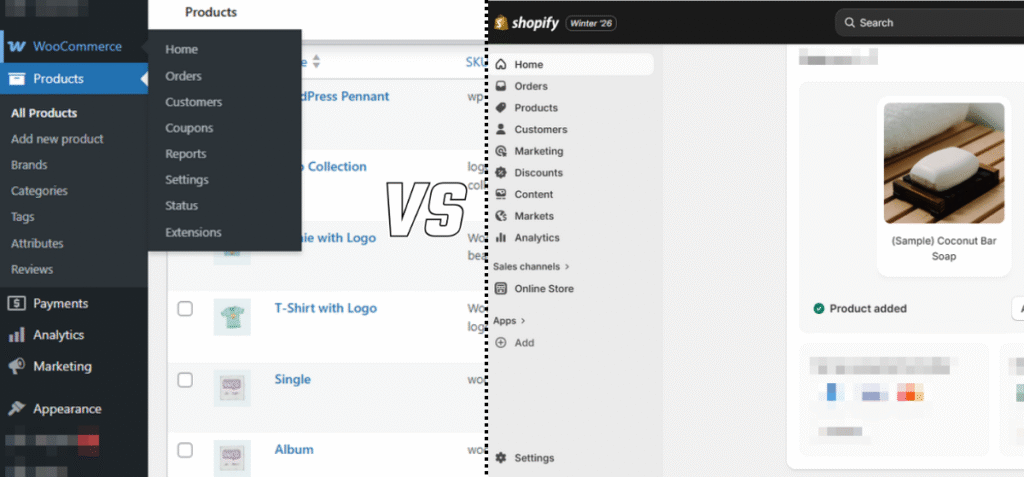
As you can see on the screenshot, Shopify’s dashboard hides complexity, while WooCommerce exposes every lever of your store.
Shopify minimizes decisions. You cannot change the checkout URL. You cannot alter the server caching rules. This guardrail approach prevents beginners from breaking their store. It is perfect if you want to sell without thinking about technology.
WooCommerce maximizes options. You can change everything from the checkout flow to the database structure.
This freedom means you can break things if you are not careful.
However, it also means you can build specific features that Shopify apps cannot offer without expensive enterprise plans.
Decision Rule:
- Choose Shopify if you want fewer decisions to make.
- Choose WooCommerce if you want better decision execution.
Pricing Breakdown: When WooCommerce Becomes Cheaper Than Shopify
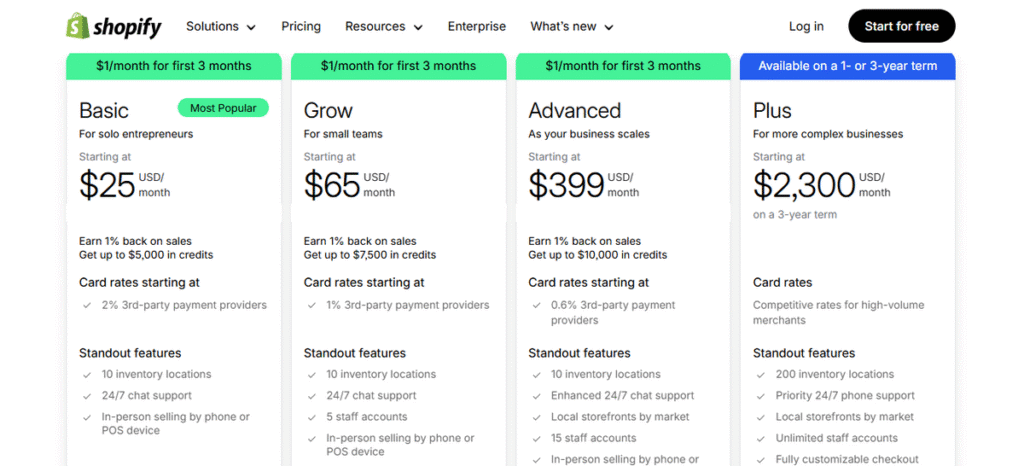
Shopify’s monthly subscription is just the entry fee. Transaction fees are where the real cost lies.
Shopify charges for convenience. The bill consists of four layers:
- Monthly Plans: Ranging from roughly $25 to $2,300 per month.
- Transaction Fees: If you do not use Shopify Payments, you pay an extra 0.5% to 2% or higher on every sale.
- App Subscriptions: Most stores need 5 to 10 apps for email marketing, upsells, or reviews. These average $10 to $50 per month each.
- POS Costs: Retail features cost extra if you have physical locations.
On the other hand, WooCommerce has no monthly subscription, but operating it incurs costs.
- Hosting: Good hosting costs $3 to $30 per month.
- Themes: A premium theme typically costs a one-time fee of $50 to $80 or even more.
- Plugins: While many are free, premium SEO or booking plugins can cost $50 to $200 or higher per year.
- Developer Costs: You might need to hire help for complex issues.
WooCommerce typically becomes cheaper after 6 to 12 months if you rely on content marketing or have high sales volume.
WooCommerce Hosting vs. Shopify Hosting
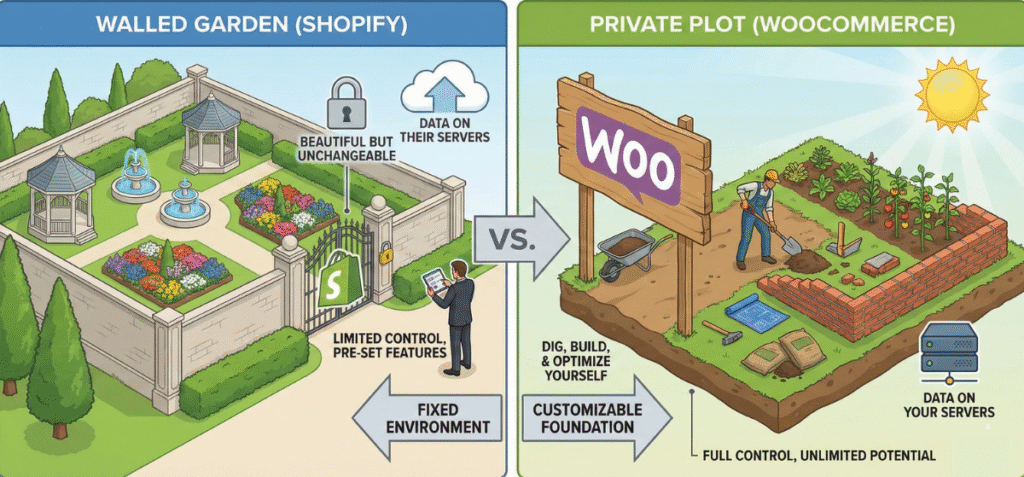
Shopify uses Google Cloud. Server-level control is limited: you can’t choose the server location, upgrade RAM, or adjust caching rules.
- Pros: You never worry about server maintenance.
- Cons: You cannot optimize the server for specific Core Web Vitals if Shopify’s global standard does not fit your local needs.
In terms of WooCommerce, you choose where your site lives. You can select a high-performance host.
- Pros: You can upgrade server resources instantly during Black Friday sales.
- Cons: You must monitor uptime and manage PHP versions.
Decision Logic:
- Prioritize Predictability? Stick with Shopify.
- Prioritize Performance Tuning? Go with WooCommerce.
Design, Themes, and Customization Depth
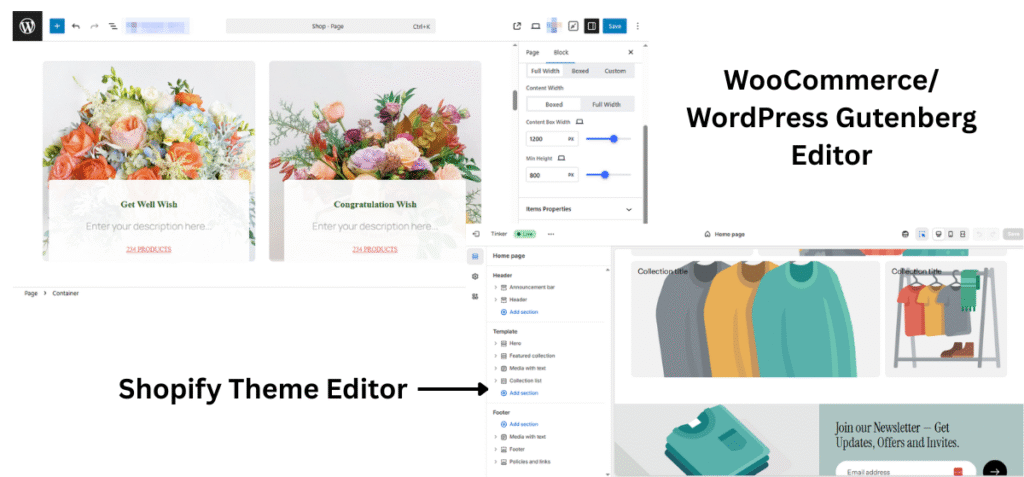
Shopify locks you into specific sections. WooCommerce allows pixel-perfect placement anywhere.
Shopify uses a templating language called Liquid. It ensures that you cannot easily break your site layout. The themes look professional immediately after installation.
However, you are often limited to the customization options the theme developer explicitly allowed. If you want to move the “Add to Cart” button to a specific spot that the theme does not support, you will need a developer to rewrite the Liquid code.
WooCommerce themes operate on open-source PHP and CSS standards. You have absolute freedom. You can use visual builders like Elementor, Bricks, or Breakdance to design custom product pages without writing code.
Payment Gateways and Transaction Flexibility
Shopify pushes you to use Shopify Payments. It is a white-label version of Stripe. If you use it, the transaction fees are waived.
However, if you use an external payment gateway for WooCommerce on Shopify (like Authorize.net or a local provider), Shopify charges you an extra 0.5% to 2% or more penalty fee on top of what the gateway charges.
This destroys margins for high-volume stores.
WooCommerce is neutral territory. You can integrate Stripe, PayPal, Square, or any local bank gateway without paying a fee to WooCommerce.
Why This Advantage Matters at Scale
- Margin Control: You can negotiate lower rates with a merchant provider as your volume grows. Shopify locks you into their fixed rates.
- International Expansion: Shopify Payments is not available in every country. If you sell in a region where it is unsupported, you are forced to pay the penalty fee on every sale.
- Payment Redundancy: You can run multiple gateways simultaneously on WooCommerce to ensure you never miss a sale if one provider goes down.
Inventory Management and Store Complexity
Managing five products is easy on any platform. Managing five thousand products with different sizes, colors, and materials is where the cracks begin to show.
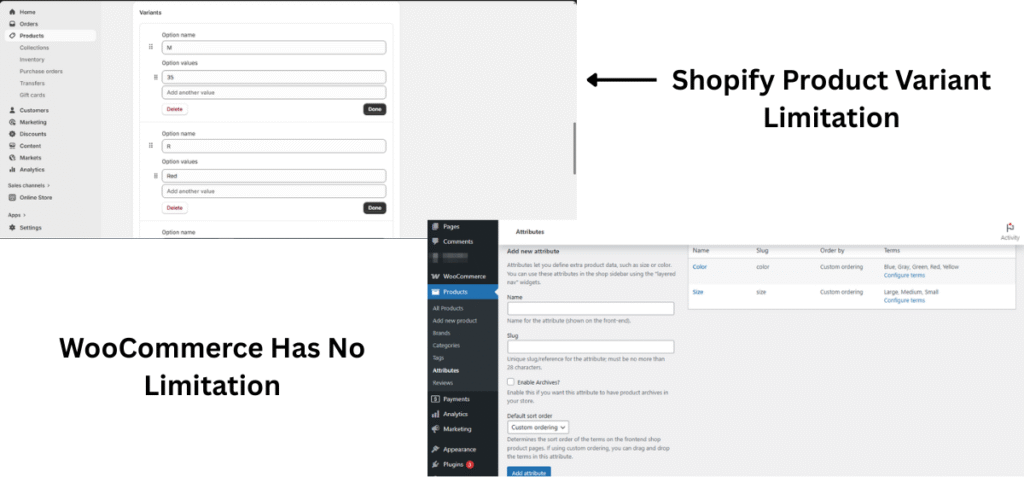
Shopify limits your product options natively. WooCommerce lets you scale complexity indefinitely.
Shopify is built for speed but has historical rigidities. It traditionally limits products to three options (like Size, Color, Material) and one hundred variants total.
While they are slowly updating this with new APIs, the native experience restricts complex catalogs. If you sell custom furniture with fifty fabric choices and ten wood finishes, you will hit a wall. You often need expensive external apps just to display these choices properly.
WooCommerce inventory management relies on the database structure, which means you have no hard limits. You can create thousands of variations for a single product.
However, displaying these options requires the right tools. The default WooCommerce dropdown lists are functional but ugly.
To attractively display your products, you can use specialized plugins like Variation Monster to turn boring dropdown lists into visual swatches.
This improves the user experience significantly by letting customers see the exact color or texture they are picking without refreshing the page.
Shopify typically requires high monthly fees for this level of visual control, whereas WooCommerce solutions offer more power for a single license fee.
Decision Rule:
- Simple Catalogs: Choose Shopify if your products are standard.
- Complex SKUs: Choose WooCommerce if you sell products with many variations, bundles, or require advanced swatch displays.
Dropshipping: Shopify vs WooCommerce
Dropshipping is often synonymous with Shopify, but that does not mean it is the only player. The best choice depends on your traffic source.
Shopify is the default choice for dropshippers who rely on paid ads. Apps like DSers connect directly to AliExpress and automate the ordering process in minutes.
The ecosystem is designed for speed. You can launch a store, run Facebook ads, and kill the store if it fails, all within a weekend.
WooCommerce dropshipping requires more initial setup. You need to install a specific plugin to connect with suppliers. However, the long-term economics are superior.
On Shopify, you pay the subscription plus transaction fees plus the monthly cost of the dropshipping app.
On WooCommerce, you generally pay a one-time fee for the plugin. This difference saves you hundreds of dollars a month once you start scaling volume.
Dropshipping plus content SEO is not a Shopify strength. If your strategy involves writing reviews and blog posts to sell dropshipped items naturally, WooCommerce wins.
You can integrate products directly into your blog posts using shortcodes or blocks and create a seamless path from reading to buying that Shopify cannot replicate easily.
SEO and Content-Led Growth
Many gurus claim that platform does not matter for SEO. They are wrong. While both platforms allow you to edit meta titles and descriptions, the structural difference is massive.
Shopify treats blogging as an afterthought. It has a blog feature, but it is rudimentary. You cannot easily create complex content clusters or use advanced schema markup without modifying the code.
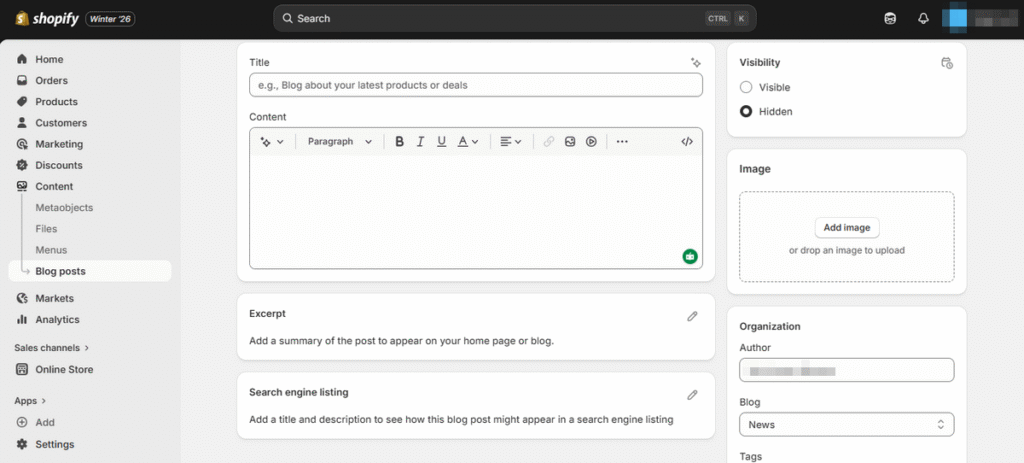
WooCommerce is built on WordPress, the platform that powers over 43% of the web.The platform includes the same block editor used by major news outlets.
You can interlink products into articles seamlessly. You can build programmatic SEO pages that target thousands of keywords automatically.
URL Control and Technical SEO
Shopify enforces a rigid URL structure. Your product pages must include /products/ and your categories must include /collections/.
This deep nesting structure dilutes link equity. It tells Google that your product is further down the hierarchy than it actually is.
WooCommerce gives you total control. You can strip the category base from your URLs. You can decide exactly how your site architecture looks to a crawler. For brands relying on organic search, this control is non-negotiable.
WooCommerce is better for SEO-driven brands. Shopify is sufficient for basic SEO.
Scalability Isn’t Just Traffic; It’s Complexity
Scalability is often misunderstood as just handling more visitors. In reality, there are two types of scaling: Traffic Scaling and Complexity Scaling.
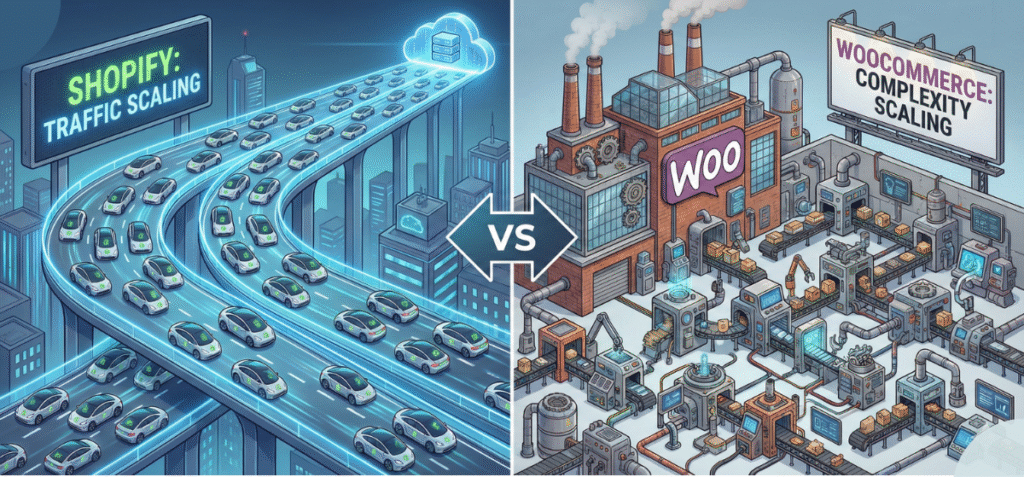
Shopify Scales Traffic Easily
If your store suddenly gets a million visitors from a Super Bowl ad, Shopify handles it beautifully. You do not need to upgrade servers or configure load balancers. Their infrastructure absorbs the spike. This is why viral brands love it.
WooCommerce Scales Complexity Better
However, scaling often means growing the business logic, not just the visitor count.
- Multilingual SEO: Shopify offers translation, but deep localization requires separate stores or expensive enterprise plans. WooCommerce handles multilingual setups natively with plugins like WPML.
- Content and Commerce Hybrid: If you want to sell courses, book appointments, and ship physical products all in one checkout flow, Shopify struggles. It creates a disjointed experience. WooCommerce handles mixed cart types effortlessly.
- Custom Funnels: As you grow, you might want a checkout flow that changes based on the user’s location or past purchase history. WooCommerce allows you to rewrite the checkout logic entirely.
Who Should Choose Shopify?
Select Shopify if your primary goal is speed and you view technology as a utility, not a competitive advantage.
- First-Time Sellers: You have never built a website. You want to focus 100% of your energy on product sourcing and marketing.
- POS Heavy Businesses: You run a physical retail store and want a system that unifies your offline and online sales without complex integration work.
- Speed Over Ownership: You are okay with renting the infrastructure because you value the peace of mind that comes with managed hosting and security.
Who Should Select WooCommerce?
Select WooCommerce if you view your website as a digital asset that you must own, control, and optimize without limits.
- WordPress Users: You already know the ecosystem.
- Content First Brands: Your marketing strategy relies heavily on blogging, SEO, and organic traffic. You need the store to be an extension of your content, not a separate island.
- Complex Product Sellers: You sell items with intricate variations (like custom blinds or technical equipment) that require advanced display tools.
- Long Run Platform Ownership: You want to ensure that no one can ever shut down your store or hike up your transaction fees arbitrarily.
Which Platform Is Better for You?
Let us remove the ambiguity.
Choose Shopify for Convenience. If you want to launch this weekend and have the budget to pay for ease, Shopify is the superior tool. Shopify is like the iPhone of eCommerce: it functions flawlessly, but it comes with its own set of restrictions.
Pick WooCommerce for Control. If you want to build a serious asset with lower operating costs and higher SEO potential over time, WooCommerce is the winner.
It is the Android or Linux of e-commerce: it requires more attention, but you can make it do anything.
Frequently Asked Questions (FAQs)
Is WooCommerce better than Shopify?
It depends on the metric. WooCommerce is better for customization, SEO, and ownership. Shopify is better for ease of setup and security management.
Is WooCommerce Really Free?
The core software is free. However, running a store costs money. You must pay for hosting, a domain name, and premium plugins.
Does Shopify hurt SEO?
It does not hurt SEO, but it caps your potential. The forced URL structure and limited content management features make it harder to execute advanced SEO strategies compared to WooCommerce.
Can WooCommerce Handle Large Stores?
Yes. WooCommerce can handle huge catalogs and high traffic volumes if hosted on a proper server. The limitation is usually the hosting plan, not the plugin itself.
Can You Switch from Shopify to WooCommerce Later?
Yes, but it is difficult. You can migrate product data and customer lists, but you cannot migrate the design or the site structure. It is often better to start on the platform you intend to scale with.