1. Overview
The Client-Side Validation on Edit Product Page feature ensures that all required giveaway fields are properly completed before a giveaway product is published.
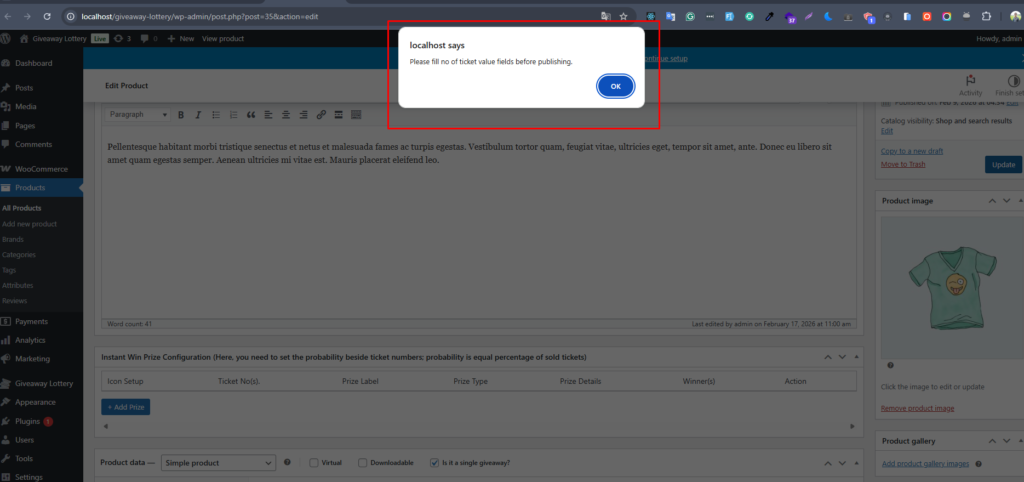
When creating or editing a giveaway product, certain fields are mandatory. If these fields are not filled correctly, the system prevents publishing and displays an error message using JavaScript validation.
This validation improves:
- Data accuracy
- Admin workflow reliability
- Prevention of incomplete campaigns
- Professional campaign setup
2. Where This Validation Applies
This validation works inside:
WooCommerce → Products → Edit Product
Specifically under:
Product Data → Giveaway Settings
Built on top of the WordPress product editing interface powered by
WooCommerce
3. Required Giveaway Fields
When creating a giveaway product, the following fields are mandatory:
3.1 Core Required Fields
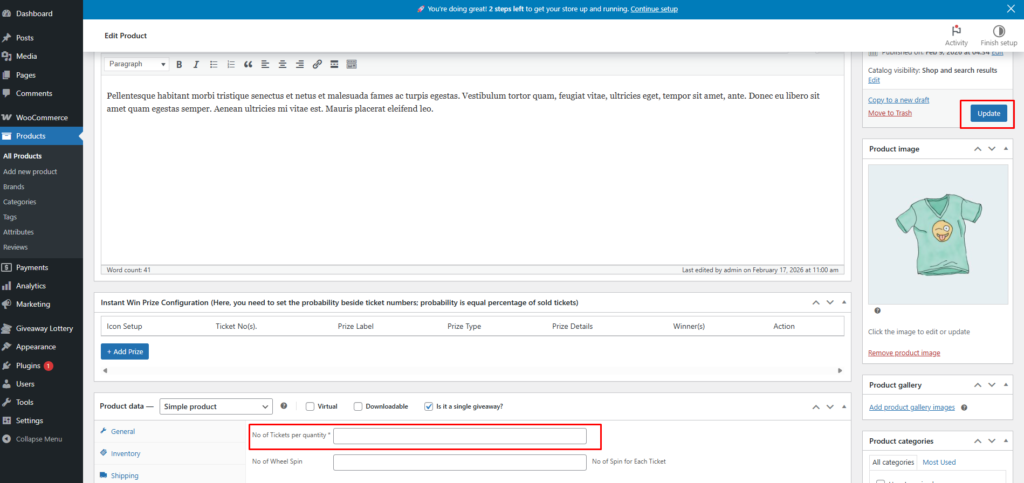
- No of Tickets per Quantity
- Ticket Selling Start Date & Time
- Ticket Selling Close Date & Time
- Giveaway Draw Date & Time
These fields are required to properly define:
- Ticket distribution logic
- Campaign duration
- Draw scheduling
4. Conditional Validation Logic
4.1 “Is it a Single Giveaway?” Option
If the admin enables:
✅ Is it a Single Giveaway?
Then JavaScript validation becomes active and checks whether all required fields are filled.
If this option is not enabled, validation may not trigger (depending on product type logic).
5. Validation Behavior
When the admin clicks:
Publish
or
Update
The system performs client-side checks before the form submission.
Validation Steps:
- Detect if “Is it a Single Giveaway?” is checked
- Check required fields for:
- Empty values
- Invalid values (e.g., 0 or negative numbers)
- If any required field is missing:
- Stop form submission
- Display an error message
- Prevent product publishing