

The Giveaway Lottery for WooCommerce plugin offers a flexible Question & Answer (Q&A) feature to enhance customer engagement during ticket purchases. This feature allows store owners to set up custom questions that customers must answer when participating in a giveaway—ideal for quizzes, surveys, or qualification checks.
How to Add Questions & Answers with Raffle Tickets?
By simply clicking the “Add Question” button, you can dynamically insert more questions for that particular giveaway product. Additionally, the plugin provides an easy way to add multiple questions for each specific giveaway.
You can create questions with two types of input:
- Multiple Choice (MCQ) options
- Text input fields

With the Giveaway Lottery for WooCommerce plugin, customers can easily participate in interactive giveaways by answering custom questions during the ticket purchase process. These questions are displayed clearly on the product page or checkout form, allowing participants to:
- Select the correct answer from Multiple Choice options (MCQ)
- Write their own answer in a text input field
This flexible system ensures that you can run quizzes, surveys, or qualification forms as part of your giveaway entry process. It enhances user engagement while maintaining a simple and professional experience for customers.
How to Disable ‘Add to Cart’ Button Until Questions Are Answered?
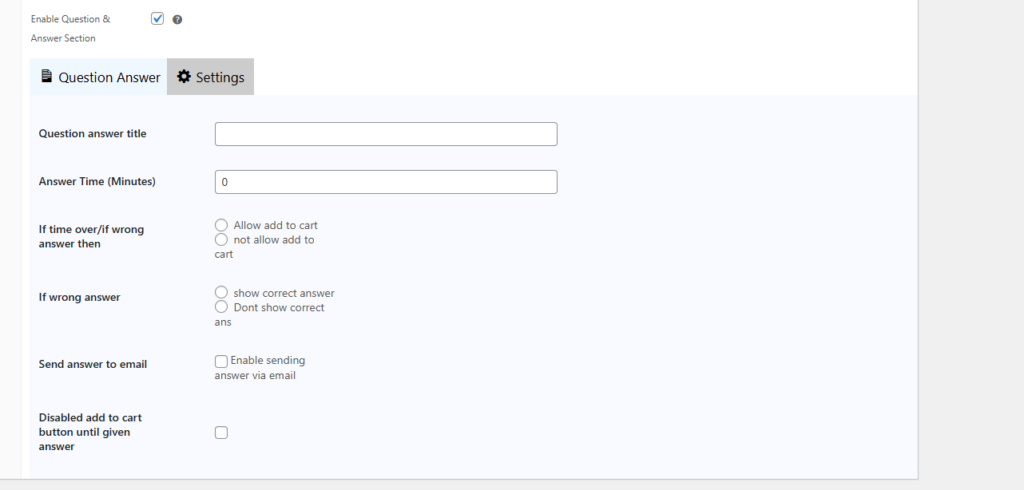
With the Giveaway Lottery for WooCommerce plugin, you can easily keep the ‘Add to Cart‘ button hidden on the product page until given questions are answered. Go to the ‘Settings‘ tab beside the ‘Question Answer’ tab, scroll down a bit, and put a check on the ‘Disabled add to cart button until given aswered’. It will be disabled instantly.
Final Outcome
When you are all done with configuration, publish the raffle ticket. In your online store, the raffle ticket with MCQ will appear like this. And if you disable the ‘Add to Cart’ button when questions are not ansered, it will stay hidden.

This is how easily you can add questions and answers with your every raffle campaign. If you need assist in configuration, reach out to our prompt support team.