You can incentivize and reward your customers for various interactions with your store by granting them reward points through multiple channels. The following four methods can be configured from the admin panel:
1. Product Reviews
Enable/Disable: Turn this reward method on or off.
Point Allocation: Set a fixed number of reward points a customer will receive after their product review is approved by an admin.
2. Account Sign-Up
Enable/Disable: Activate or deactivate the sign-up bonus.
Point Allocation: Define the number of reward points automatically awarded to a customer when they successfully create a new account on your store.

3. Purchase Reward Rules
Point Allocation: Set up flexible rules to determine how points are earned from purchases. This typically includes:

4. Lucky Wheel Game
Point Allocation: When setting up the Lucky Wheel, you can add a “Reward Points” slice. For this slice, you specify the exact number of points a customer wins when the wheel lands on that segment.

5. Individual Products Buy
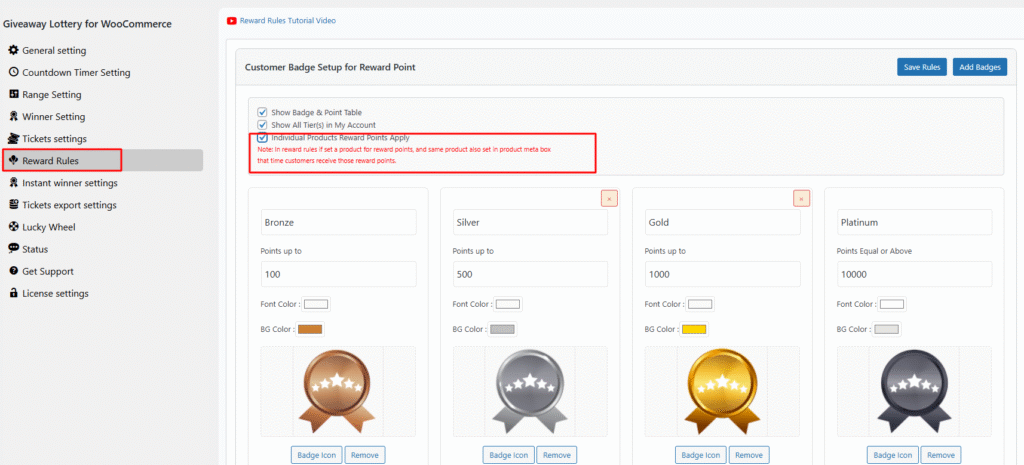
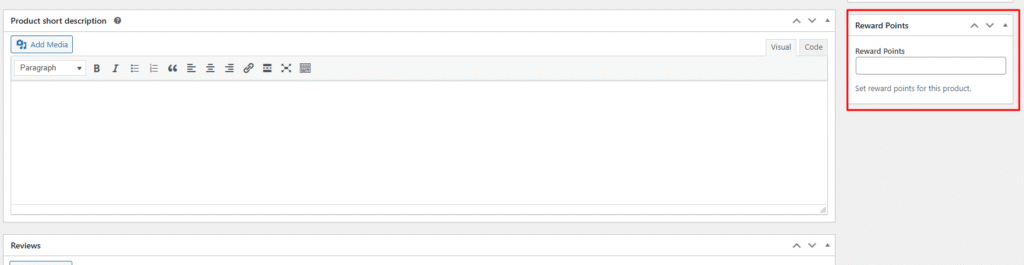
Point Allocation: First you need to enable “Individual Products Reward Points Apply” then you can see a meta box in edit product page, here you need to set reward points. When customer buy this product that time they are getting those amount of reward points that you set into meta box.