Spin & Grab 100% OFF

Get Essential Woo Plugins That’ll Boost Sales & Retention. Limited time

Days
Hours
Minutes
Seconds

Carousel and Table General Setting

  1. Home
  2. Docs
  3. Variation Monster
  4. General Settings
  5. Carousel and Table General Setting

Carousel and Table General Setting

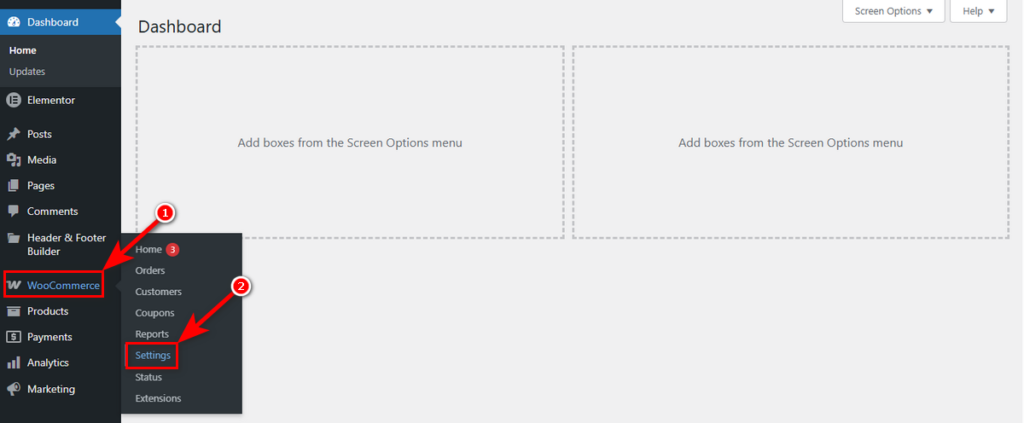
You can access these options by navigating to WooCommerce > Settings.
Then, click the Variation Monster tab.
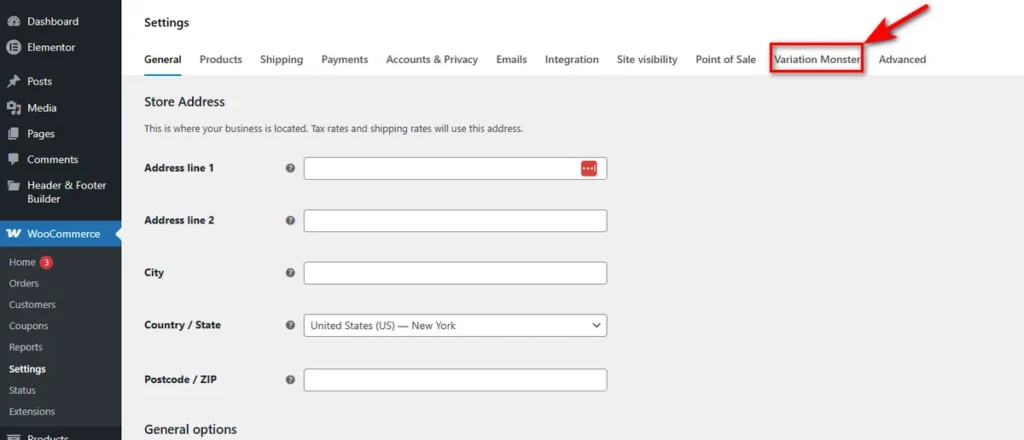
Now, you can see all the settings of Variation Monster. Let’s get started with the first one: General Setting 

Controls under the General Setting work as the master style sheet for your interactive elements, ensuring consistency whether a customer is viewing a Variation List or a quick cart carousel.

Articles

How can we help?

Wait…

Spin & grab 100% off

Check your luck — grab exclusive discounts on advanced Woo plugins, or better luck next time.

Click to Win
No spam. Limited-time offer.
//