Hot Deal

Spin & Grab 100% OFF

Get Powerful Gift Card Plugin & More Exciting eCommerce Tools Limited time

00 Days
00 Hrs
00 Min
00 Sec
Claim now

Configure Bulk Add to Cart Position

Variation Monster for WooCommerce

⌘K
  1. Home
  2. Docs
  3. Variation Monster for Woo...
  4. Table Setting
  5. Configure Bulk Add to Cart Position

Configure Bulk Add to Cart Position

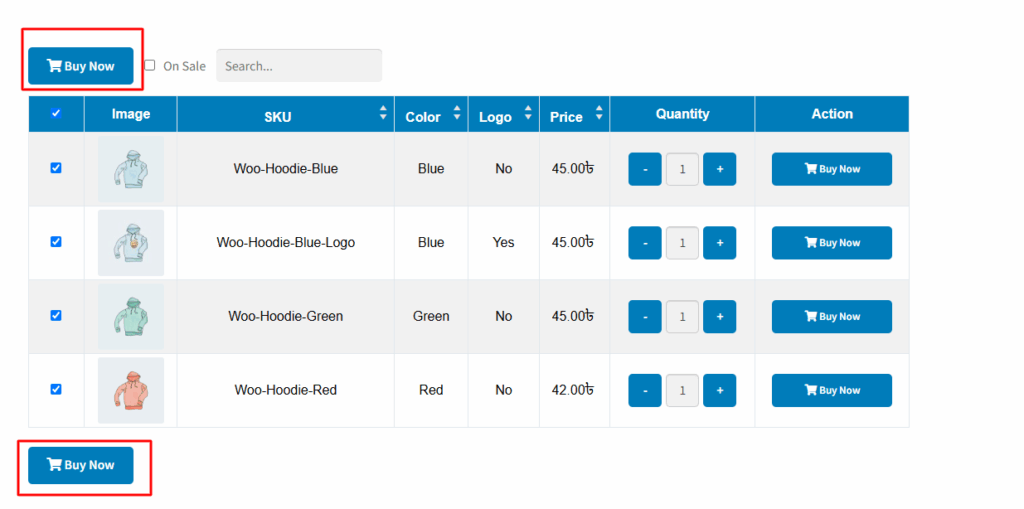
The “Bulk Add to Cart Position” setting in the Variation Monster plugin allows you to control where the Bulk Add to Cart button appears on the single product page. You can choose to display the button before the table, after the table, or in both positions simultaneously.

This flexibility ensures a better user experience by placing the button where it’s most convenient for your customers, depending on the length and layout of the variation table.
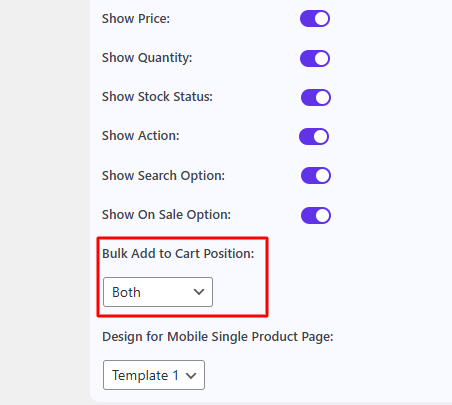
After change this position it show into before or after or both this table.
How can we help?

Leave a Reply

Wait…

Spin & grab 100% off

Check your luck — grab exclusive discounts on advanced Woo plugins, or better luck next time.

Click to Win
No spam. Limited-time offer.