Hot Deal

Spin & Grab 100% OFF

Get Powerful Gift Card Plugin & More Exciting eCommerce Tools Limited time

00 Days
00 Hrs
00 Min
00 Sec
Claim now

How to Change Pagination Button Text Color

Variation Monster for WooCommerce

⌘K
  1. Home
  2. Docs
  3. Variation Monster for Woo...
  4. Table Setting
  5. How to Change Pagination Button Text Color

How to Change Pagination Button Text Color

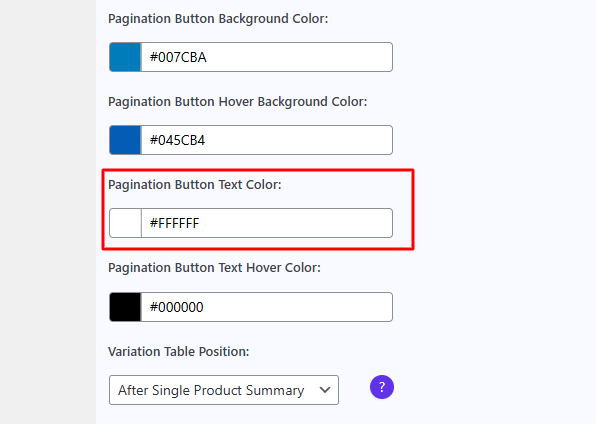
The “Pagination Button Text Color” setting allows you to customize the default text color of the pagination buttons in the variation table. These buttons appear when the number of variation rows exceeds the set limit, enabling users to navigate between multiple pages of variations.

By adjusting this setting, you can match the button text color with your website’s branding and ensure that the pagination controls are clearly visible and easy to read.
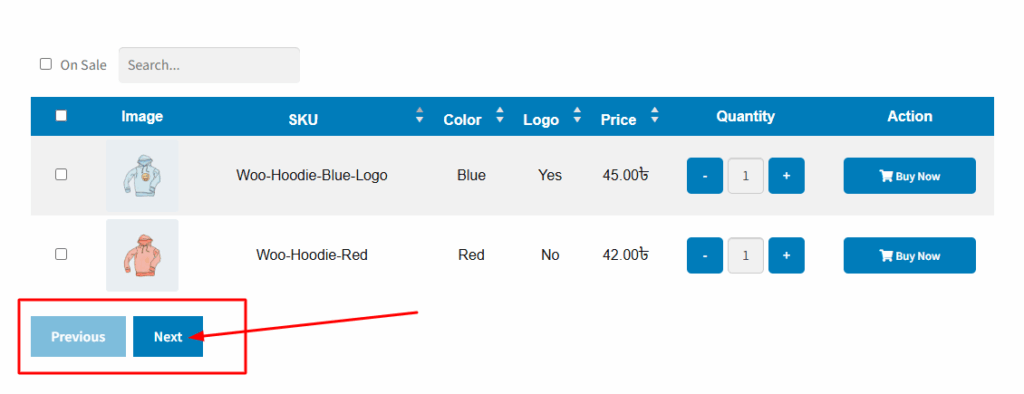
After changing the text color, you can see it applied below the table.
How can we help?

Leave a Reply

Wait…

Spin & grab 100% off

Check your luck — grab exclusive discounts on advanced Woo plugins, or better luck next time.

Click to Win
No spam. Limited-time offer.